Word Solitaire
- 4.8
- Rating
- 50.00K
- Installs
- Free
- Price
 Analysis by App-foxy
I went into Word Solitaire expecting a simple word puzzle with a card-game theme, and that is broadly what I found: a free word game from AAA Fun that asks me to combine familiar solitaire-style decisions with spelling and pattern recognition. It is easy to understand within a few minutes, but the best results come from slowing down before making an obvious match. That small change turns it from a casual time filler into a game with a surprisingly thoughtful rhythm.
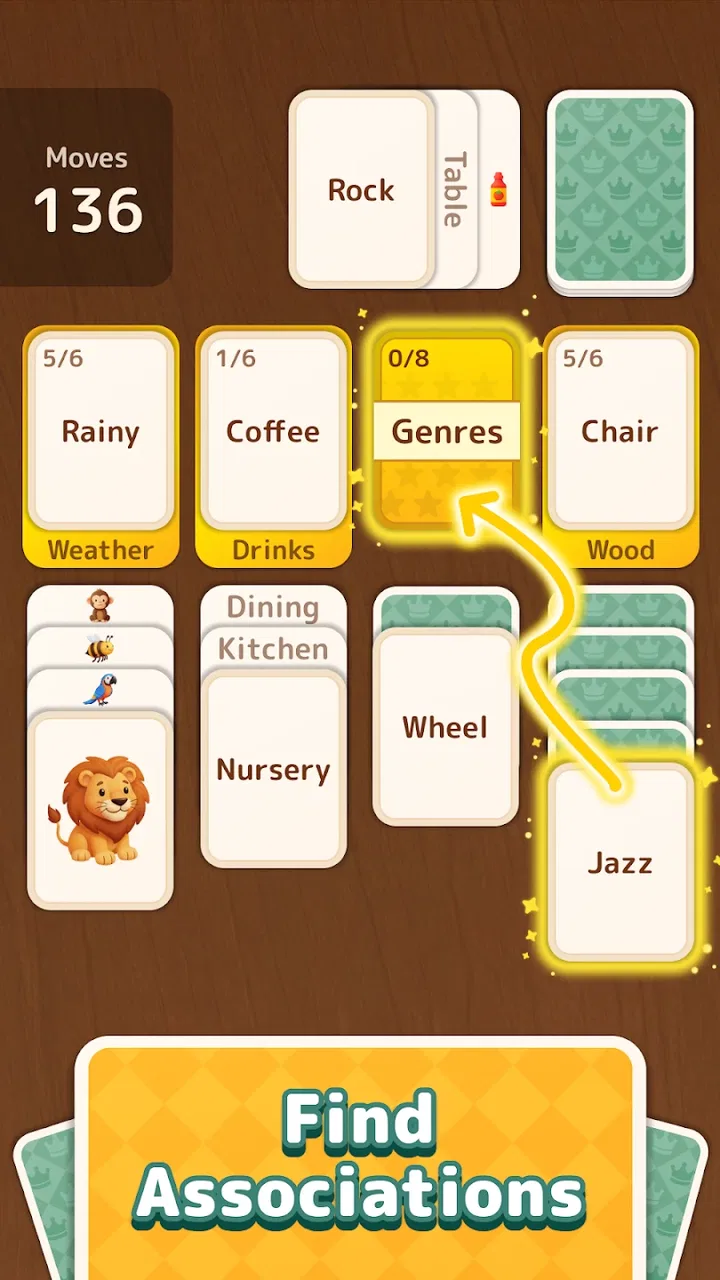
The basic appeal is clear. You work through a board by matching and connecting letters or words, then clearing space so new possibilities become available. The solitaire influence gives each move a sense of order, while the word element makes the board feel less mechanical than a standard card layout. I enjoyed that combination because it rewards both quick recognition and a little planning. It is not a traditional crossword, and it is not ordinary Klondike solitaire either; its identity comes from sitting between those two familiar formats.
AAA Fun presents it as a word game for Everyone, and I think that description fits the learning curve. A player who already enjoys anagrams, word searches, or card puzzles can start without much explanation. At the same time, someone who normally avoids difficult vocabulary games will not be thrown into a complicated rule set. The challenge comes from choosing the right sequence, not from memorizing a large collection of instructions.
You May Also Like

 Blood Strike: 2.5 Anniversary
Blood Strike’s Loadouts Turn Every Drop Into a Tactical Gamble
A close look at Blood Strike’s custom loadouts: how fast access to signature weapons reshapes its battle royale rhythm, rewards preparation, and narrows the gap between fights.

 Pandora - Music & Podcasts
Pandora’s Music Is Easy to Start, but Harder to Recover
Pandora’s strength is its low-effort path from a seed to a station. Its weak spot is how much confidence it asks you to place in connection, setup, and quiet recovery.

 8 Ball Pool
 Is Built on Rivalries, Rematches, and Routine
A close look at the rivalries, rematches, shared routines, and unanswered safety questions that turn a quick pool match into a persistent mobile community.

 Samsung Music
’s Quiet Strength Is Playing What You Already Own
Its reach comes less from spectacle than from dependable access to a personal library. That simplicity is both the app’s strongest retention engine and its ceiling.

 AccuWeather: Weather Radar
AccuWeather Review: A Quick, Clear Forecast for Everyday Decisions
For everyday plans, the best forecast is the one you can understand quickly. AccuWeather makes rain timing, radar, and local conditions easy to act on, with a few trade-offs.

 Hill Climb Racing
Why Hill Climb Racing Still Turns Crashes Into One More Run
A tiny car, a bumpy hill and one more upgrade: Hill Climb Racing keeps resurfacing because its simple chaos makes every near-miss feel personal.
More From Our News Desk
View All News


How the board feels in everyday play
I find that the board’s main appeal is how a small choice can change what becomes visible next, so this section focuses on reading the layout rather than chasing the first word I spot. A useful habit is to pause after each clear and scan the newly exposed area before planning again; it keeps a quick session manageable without making every move feel hurried.
A dependable starting routine
My most reliable way to begin a round is to scan the entire visible board before touching anything. The first attractive connection is not always the best one. Clearing a short word may expose a useful letter, but it can also remove the only route toward a longer combination. I found it helpful to identify two or three possible moves first, then choose the one that opens the most space rather than the one that looks most satisfying immediately.
That habit matters especially when I am playing in short bursts. Imagine waiting for a bus or taking a few minutes between tasks: the natural impulse is to tap quickly and keep the board moving. Word Solitaire is more enjoyable when I use those minutes to make one deliberate scan, because the game gives me enough visual information to make planning worthwhile. It remains relaxed, but it does not feel completely random.
The standard workflow is straightforward. I look for available words, connect the useful letters, clear what can be removed, and then reassess the new arrangement. The important part is the reassessment. A newly opened area can change the value of every remaining letter, so I try not to plan several moves ahead as if the board were fixed. I treat each clear as a new position rather than blindly following the first plan I made.
One practical trick is to separate “progress” from “appearance.” A large word may look like the ideal target, yet a smaller word can be more valuable if it uncovers a blocked letter. Conversely, clearing several tiny options can leave the board with fewer meaningful routes. I therefore ask myself one question before committing: will this move create choices, or merely remove something that was already easy to remove?
Why the solitaire element changes word-game habits
In a typical word search, I can often hunt for every possible word without worrying about order. Here, order is part of the puzzle. A word that is available now may become irrelevant after another connection, while a letter that seems useless can become important once the surrounding cards or tiles are cleared. This gives the game a gentle form of resource management that I do not get from a conventional anagram app.
That structure also makes it different from a standard solitaire game. Traditional solitaire mainly tests sequencing and suit or rank relationships. Word Solitaire adds language judgment: I have to notice likely words, recognize short connectors, and decide whether a move improves the whole board. Players who want pure card logic may find the vocabulary layer distracting. Players who want a word puzzle with more spatial and sequential pressure may find it refreshing.
The game works best for people who enjoy low-pressure concentration. I can play it casually while listening to music, but I get more from it when I give the board a little attention. It is suitable for a quick mental reset, a quiet evening session, or a break from more competitive games. I would not choose it for someone looking for a story, a deep progression system, or fast action. Its pleasure comes from solving one compact arrangement at a time.
Settings and small habits worth checking
Before settling into regular play, I recommend looking through the available settings rather than assuming the default presentation will suit everyone. In a word game, visual comfort and input behavior matter more than they might in a racing or action title. Check the sound controls, notification behavior, and any display options the current build offers. I avoid unnecessary interruptions when I want a focused session, and I prefer audio that does not compete with the letters.
It is also worth checking how the game responds to taps and whether the board gives enough visual feedback after a selection. If a move feels unclear, I slow down and watch for the confirmation state before making the next connection. That is not glamorous advice, but it prevents a common mistake: continuing from an assumed move and then losing track of what the board actually changed.
The current version is 1.10.0, and the game runs on Android 7.1 or later. That broad compatibility makes it practical for people using older Android hardware, although the experience will naturally depend on the phone’s screen size and responsiveness. On a smaller display, I would use a slower scanning rhythm and keep the device clean of overlapping notifications. Letter-based games are especially vulnerable to tiny visual distractions because one misread character can alter the entire decision.
Since the game is free to install, it is easy to try without committing money first. It does include optional in-app purchases ranging from $0.99 to $119.99 per item, so I would check the purchase controls before handing the phone to a child. The Everyone age classification makes the game approachable for a broad audience, but the presence of optional purchases is still a practical detail for families to manage.
I also recommend deciding what kind of session you want before starting. If I am playing for relaxation, I accept slower progress and avoid forcing a move just to finish quickly. If I am trying to improve, I replay my decision process mentally after a difficult board: did I miss a short word, clear the wrong blocker, or fail to preserve a useful opening? That reflection is more valuable than simply tapping faster.
Patterns that make play faster without making it careless
The fastest improvement I noticed came from scanning in layers. First I look for obvious short words and isolated letters. Next I search for longer or more flexible combinations. Finally I inspect what each option would expose. This is quicker than staring at the board randomly because it gives my eyes a repeatable route. It also reduces the temptation to commit to the first familiar word I notice.
Another useful pattern is to prioritize moves that increase future visibility. If two choices remove a similar amount, I favor the one that reveals a larger portion of the board. More information usually leads to better decisions than a move that only produces a satisfying immediate clear. This is one of the game’s less obvious strengths: the board rewards information gathering, not just vocabulary.
I try to keep flexible letters available when possible. A common letter can support several words, while an unusual one may depend on a very specific arrangement. That does not mean I always preserve the rare letter; sometimes removing it is exactly what opens the route forward. The trade-off is to avoid spending a versatile letter merely because it is convenient when another move would accomplish the same short-term goal.
When I am stuck, I stop searching for a perfect word and instead search for a useful change in board shape. This shift is important. The best move may be a modest connection that exposes new material, not the longest word I can currently see. I found this particularly helpful after making an early mistake, because it turns a frustrating position into a recovery exercise rather than a reason to rush.
A repeatable routine for experienced players is to pause after every major clear, identify the newly available area, and then rescan from the top. I know it sounds slower, but it usually saves time by preventing tunnel vision. Once I began doing this, I made fewer accidental moves and felt more in control of difficult boards without needing any invented shortcut or special technique.
Where the game asks for patience
The main limitation is that the experience depends heavily on whether you enjoy this hybrid format. If you want the vocabulary depth of a serious crossword or word-building game, the solitaire framework may feel restrictive. You are not simply generating the most impressive word; you are working within the board’s available paths. Someone who prefers open-ended wordplay may find that constraint less satisfying than a dedicated anagram or crossword app.
There is also a natural ceiling to the strategic depth. The game can make a small board feel meaningful, but it does not replace a full competitive word platform with extensive dictionaries, head-to-head play, or long-term ranking goals. I would choose a more specialized alternative for tournament-style competition, detailed vocabulary study, or a campaign with a strong narrative. Word Solitaire is better understood as a focused casual puzzle, not an all-purpose word-training system.
The purchase range is another point to consider. The game is free, which lowers the barrier to entry, but optional items can become a distraction for players who prefer a completely self-contained experience. I would approach purchases cautiously and decide in advance whether I am comfortable spending anything. The game’s core appeal should be judged during the free experience rather than assumed from the availability of extras.
Players who need constant novelty may also lose interest sooner than those who enjoy refining a familiar process. The pleasure here comes from improving recognition and decision order, not from dramatic changes in genre. That makes it a good companion game, but perhaps not the right main game for someone who needs frequent rewards, social competition, or major content shifts.
Who should download it, and who should skip it
I would recommend it to people who like both word puzzles and solitaire but want something lighter than a full crossword session. It is especially suitable for adults who want a calm game during short breaks, families looking for an accessible word activity, and puzzle fans who enjoy improving through repeatable habits rather than memorizing complex rules. The Everyone rating supports its broad approachability, while the board structure gives experienced players enough room to make better and worse decisions.
I would be more cautious about recommending it to someone who dislikes reading on a small screen, becomes frustrated by constrained word choices, or expects every move to have an obvious best answer. It is also not my first choice for players seeking an online opponent, a story-driven adventure, or a traditional solitaire ruleset. In those cases, a dedicated alternative would likely fit better than trying to make this hybrid format behave like something else.
Its audience is already substantial, with over 50 thousand installs and an average rating of 4.8 from 428 ratings. Those figures suggest that the concept has found a receptive group, but they do not remove the need to test the style personally. A strong rating cannot tell me whether I will prefer word discovery, card sequencing, or another kind of puzzle. The free entry point makes that decision easy enough to make for myself.
My verdict after settling into the system
After spending time with it, I see Word Solitaire as a neat middle ground rather than a replacement for every word or card game. Its strongest quality is the way it makes familiar vocabulary feel tactical. I am not only asking what word I can see; I am asking what that word will reveal, what it will block, and whether the next position will be easier to read. That extra layer gives otherwise short sessions a reason to stay engaging.
The best way to enjoy it is to build a calm routine: scan before tapping, check the board after every meaningful clear, preserve flexible options when practical, and use settings that keep the screen and sound comfortable. Those habits make the game feel more deliberate without turning it into work. They also expose its real trade-off: the more carefully I play, the more rewarding it becomes, but players wanting instant, effortless entertainment may prefer a simpler word game.
AAA Fun has made a focused casual title with a clear personality. It is free, accessible on older Android versions, and easy to sample, while optional purchases mean families should keep an eye on spending controls. I would recommend giving it a try if the idea of combining word recognition with solitaire-style sequencing sounds appealing. My strongest recommendation is for patient puzzle players who enjoy finding the best next move, not merely the fastest one.
For me, the game succeeds because it respects short sessions while still rewarding improvement. I can play it casually, but I can also refine a real method for handling crowded boards and awkward letters. It will not satisfy every word-game fan, and its hybrid rules are precisely what some players may dislike. For the right audience, though, Word Solitaire is a pleasant, thoughtful way to turn a few spare minutes into a small exercise in language and planning.
FAQs for Word Solitaire
01What is Word Solitaire and how does it work?
Word Solitaire is a unique blend of traditional solitaire and word puzzles. Players must arrange a deck of cards to form words horizontally and vertically, similar to a crossword. The objective is to clear the board by constructing valid words using the given cards. It's a fun and challenging way to enhance vocabulary skills while enjoying classic solitaire gameplay.
02Is Word Solitaire available on both Android and iOS platforms?
Yes, Word Solitaire is available for download on both Android and iOS devices. You can find it on the Google Play Store for Android users and the Apple App Store for iOS users. The game is designed to run smoothly on a wide range of devices, ensuring a seamless gaming experience.
03Does Word Solitaire require an internet connection to play?
Word Solitaire can be played offline, which makes it convenient for users who want to enjoy the game without an internet connection. However, some features, such as leaderboard updates and syncing progress across devices, may require an internet connection to function properly.
04Are there any in-app purchases in Word Solitaire?
Word Solitaire offers in-app purchases that enhance the gaming experience. Players can buy hints, additional themes, or remove ads for a more streamlined experience. While the game is free to download and play, these optional purchases support the developers and provide extra features for dedicated players.
05Is Word Solitaire suitable for all ages?
Word Solitaire is designed to be family-friendly and suitable for players of all ages. Its educational aspect makes it particularly beneficial for younger players looking to improve their vocabulary. The difficulty can be adjusted to cater to different skill levels, ensuring that everyone from beginners to experienced players can enjoy the game.
Pros
- Engaging and challenging gameplay.
- Intuitive user interface.
- Offline mode available.
- Regular updates with new features.
- No intrusive ads during play.
Cons
- Limited deck customization.
- Occasional lag on older devices.
- In-app purchases can be pricey.
- No multiplayer mode available.
- Some levels feel repetitive.

Word Solitaire
Gallery